When the Apple silicon Macs with M1 chips came out, I read and watched many of the reviews. Most of them had great things to say about the promise of Apple's new M1 chip...I was impressed. When I finally received my Apple M1 MacBook Pro, and started to use it...I was amazed.
Back in 2020, FileMaker Pro wasn't optimized yet for Apple silicon processors, but ran fine under Rosetta emulation. On my M1 MacBook Pro, it already felt much faster than running FileMaker 'natively' on an Intel-based MacBook...I was astonished.
I started running the just-released Claris FileMaker® 19.3, with native support for Apple's M1 chip, on a new MacBook Pro. In a word: Astounding!
Rethink. Redefine. Recreate.
Further back, in 2014, I attended my first 'Ted' event, TedxBerkeley. The theme of the conference resonated with me: Rethink. Redefine. Recreate. I am a big believer that we can always improve upon what we already have, especially as FileMaker itself continues to evolve. Even small things can lead us to improving our work, like better comments in our code, new ways to visualize data, improving the user experience, or maybe even experimenting with emoji 👻 to define new import types or simply spice things up and make the comments more fun to read.
Certainly, some the most exciting times are when new features come along to improve performance while still achieving the same results...but with much shorter wait times, for users and for developers 👏.
Enter FileMaker Universal
Claris FileMaker Pro 19.3 and Claris FileMaker Server 19.3 were the first to support Apple silicon. As 'universal' macOS binaries, they also ran great on Intel-based Macs, but the big news here was the performance on Apple silicon.
I've been astonished to see how much more fluid it is to work with the universal version of FileMaker on an Apple silicon MacBook Pro. Everything about the machine itself is so responsive. The battery life is like nothing I have ever experienced with any laptop I have owned. It even made me question the traditional wisdom, 'For better battery life, you'll sacrifice performance. For better performance, you'll sacrifice battery life.'
Still to this day, with all the punishment I put that new little M1 machine through, I never heard the fan kick in... EVER!
Testing FileMaker on Apple M1
Ok, so I had this M1 machine sitting in front of me, and had early access to a pre-release universal version of FileMaker 19.3. I started asking my team what we should we run to test performance … and we drafted up the following list of tests:
- Sorting
- Finding
- Deleting (cascading deletes)
- Creating Data (using native FileMaker)
- Creating Data (using Transactional methods)
- Importing Data
- Showing Related Records
- Create large JSON object using FMP JSON functions
- Using native FileMaker aggregate functions
- Using Execute SQL aggregate functions
- Getting a list of values with > and < operators
At first I was going about this by creating different test files for each of the above tests. But I quickly realized this was going to be a great deal of work. I wanted to have the same columns for all the tests, for comparing, reporting on and visualizing the test results. My fellow developer Steve Senft-Herrera jumped in to lead the way and architect an elegant solution that has a great deal of flexibility and customizability. Thank you, 🙏 Steve.
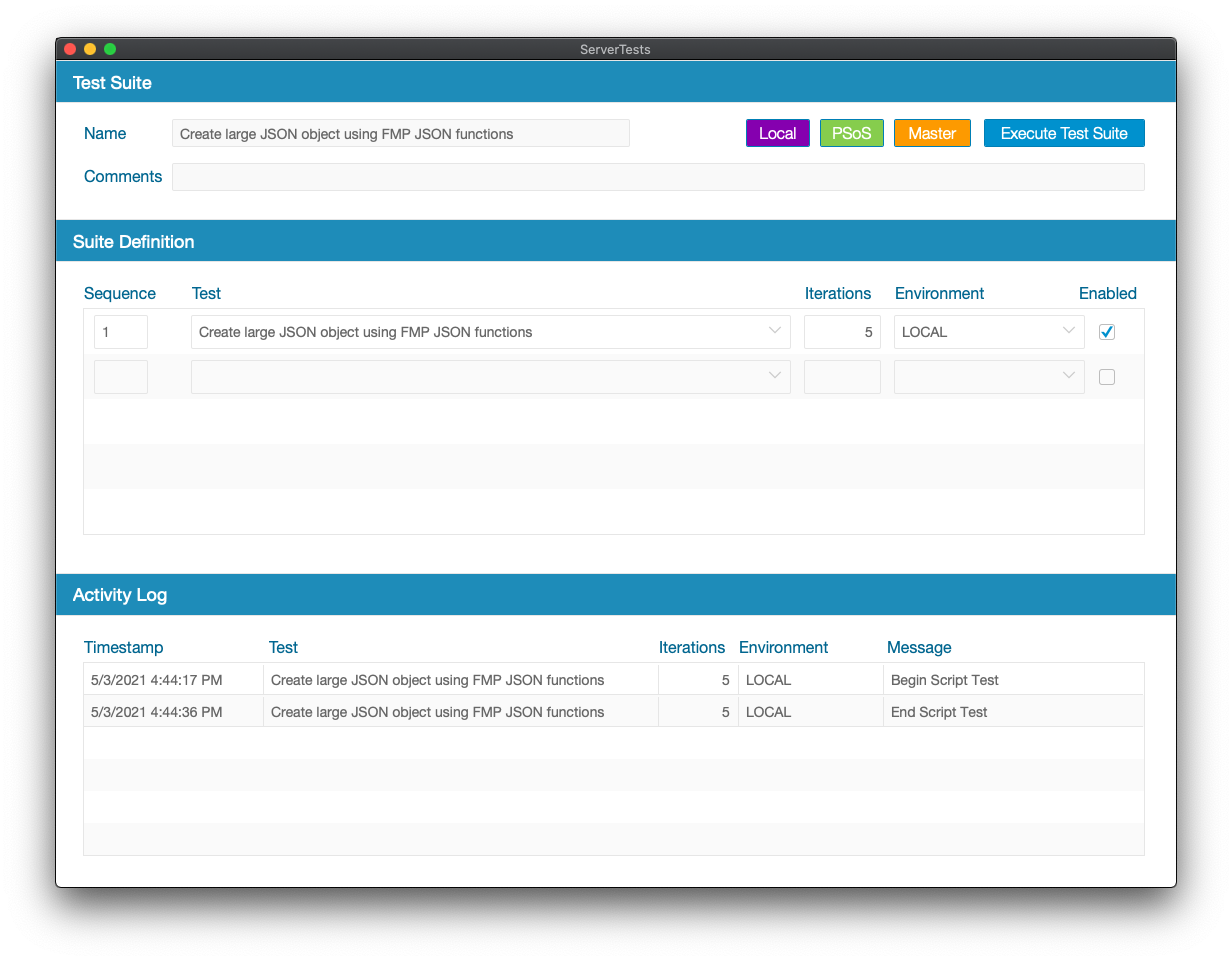
Here is a screen shot of this test system that Steve helped architect. It has been so easy to collect the results of these tests in FileMaker, and then feed that data into Tableau for analysis and comparison.
That helped me focus on the tests and the resulting data:
ID_TEST_SUITEITERATION_NUMBERARCHITECTUREDESCRIPTIONHARDWARESYSTEMPROCESSORMEMORYVERSIONENVIRONMENTINDEXESDURATIONGROUP
I wanted the tests to be as realistic as possible. So, I wanted to use a large data set that would be representative of some real world scenarios. Will Baker (an avid movie fan) furnished me with his Movie Database, which contains data for 124 Theaters, 1945 Movies, and 1,125,080 Showings (movie showtime instances). For most of the tests we used this data set, and for some tests we used additional tables.
Each test was executed 5 times. When using the results in our dashboards we only calculated the average of across 4 tests (not including the first test). The reason to exclude the first test is because FileMaker might do more work on the first test and then subsequently other executions of the same test can get cached. Thus we only calculated the average on the cached tests.
Testing FileMaker on M1 vs Intel
Here is an example of the results for importing 1,125,080 records into the SHOWING table. In the first test we import just raw data without an index. In another test we import into a table where 7 of the fields have indexing turned on.
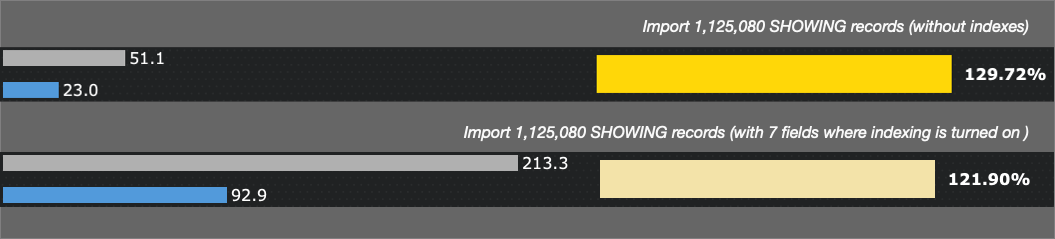
The results are astounding. FileMaker 19.3 on M1 took only 23 seconds to import over 1.1 million records, while on Intel it took 51 seconds. With indexing turned, on M1 it took just over 90 seconds, and over 3 minutes on Intel. Again, astounding to me. I remember the early early days of FileMaker when the progress dialog was marking progress by 5 record increments at a time. Then FileMaker 7 came along and blew all of that apart. And now today we have M1 setting some incredible performance numbers and it is just the beginning.
Test Results, Visualized
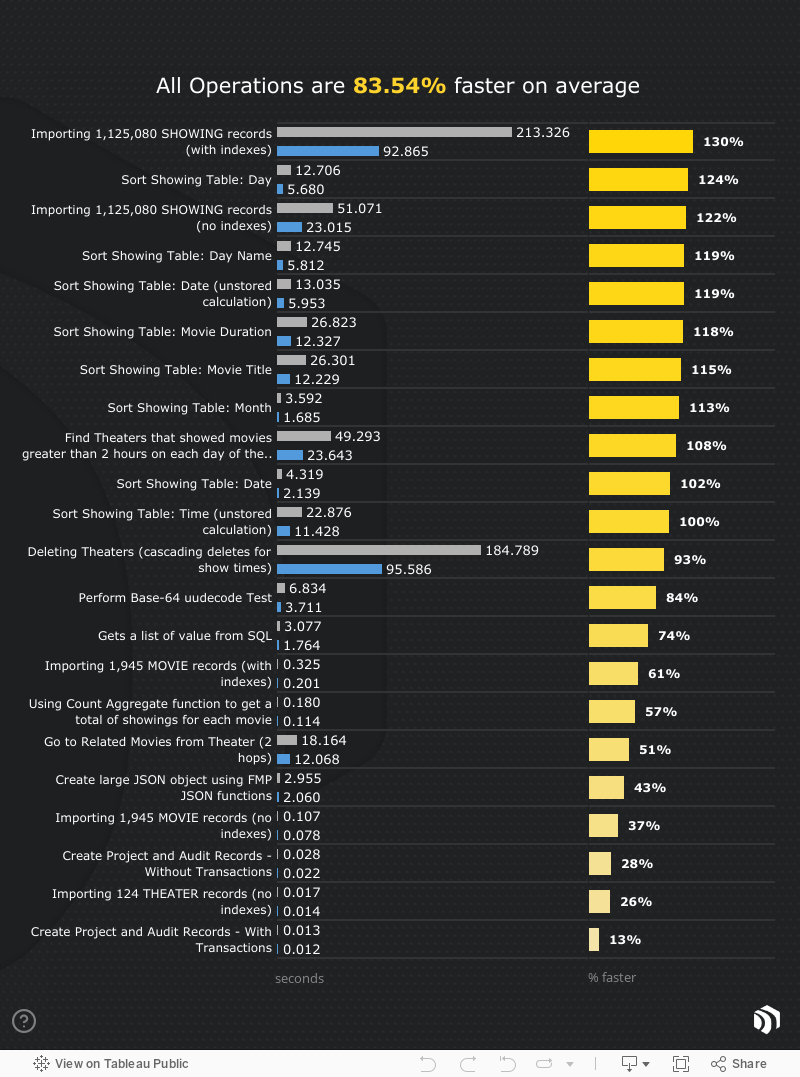
We took all the results and put them into a Tableau dashboard, to explore different areas and see some of the most taxing aspects of FileMaker and how it compares when run on Intel vs Apple M1.
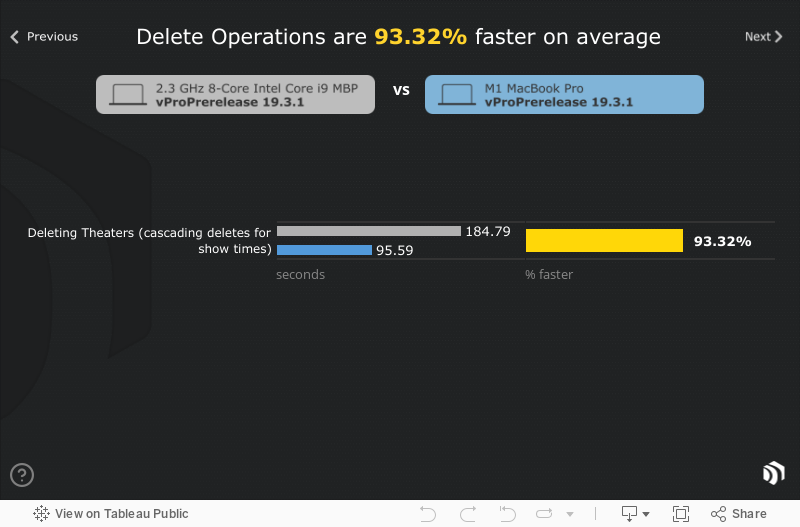
Click Next or Previous to view each test, and mouseover or tap for some more detail:
Machines/Hardware
Here is my Intel-based MacBook Pro, used for testing:

Here is my M1 MacBook Pro, used for testing:

Conclusion
I was testing with a few different builds of FileMaker, and some tests were even a little bit faster. Overall, moving to Apple silicon with new versions of FileMaker is such a joy. It's nothing like I can describe, you will have to experience it directly. It's like telling someone what it feels like to accelerate in a Tesla model 3 with a dual motor... amazing and almost indescribable - 😜!
If you have been using FileMaker, even on a fairly recent Intel-flavored Mac, you should see a noticeable difference when using Apple silicon. I can't wait to see what is in store with FileMaker moving forward.
Thank you to Apple for setting this new bar for the level of performance and productivity, and continuing to create powerful and responsive hardware. And a big Thank You to the entire Claris Team for the hard work that you do building and supporting the FileMaker platform.
Totally Astounding - 👻!