We often need large amounts of random text to simulate real-world data loads while building a FileMaker solution. I was looking to create a large chunks of unique data for testing -- we're talking at least millions of characters. Here, I'll compare the performance of a few methods I tried.
Limits of the Basic FileMaker Custom Function Method
I wanted to test the creation and modification of large amounts (over 1 GB) of data in a FileMaker system. To help keep the test accurate, I wanted to keep the data fairly random, and definitely have each chunk be unique. Initially, I tried a few native custom functions that have been published, but they didn't perform well for sizes over more than 10K characters.
For one of them, the calculation used was this:
If ( number ; Middle ( text ; Int ( Random * Length ( text ) ) + 1 ; 1 ) & RandomString ( text ; number - 1 ) ; '' )
This function, like most of them, has an upper limit of just under 50K since it uses recursion. (FileMaker's recursion limit is adjustable however using the SetRecursion function).
The FileMaker UUID Method
A colleague suggested using FileMaker's Get (UUID) function, and I also made use of FileMaker's While function. Below is my implementation:
While (
  _result = '';
  Length (_result) <= number;
  _result = _result & Get (UUID);
  Left (_result; number)
)
This gave a more limited range of characters than the other solutions, but had execution times that were 7 times faster, and raised the upper limit of the text it could create to just shy of 1,800,000 (36 * 50K) characters. Generating 1.75 million characters still took 25 seconds on my test system however.
Some Python Approaches
Next up was trying some Python code using the bBox plug-in, specifically using the bBox_Python3Run function:
bBox_Python3Run (
3;
'import random, string, sys;
length = int (sys.argv[1]);
letters = string.ascii_letters + string.digits + ' ';
print (''.join(random.choice(letters) for i in range(length)));';
'';
$count)
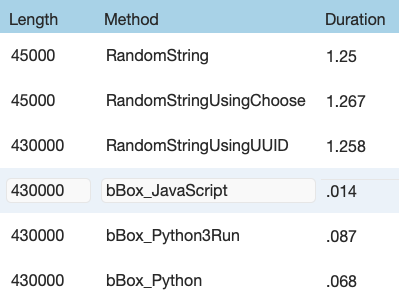
I had to write this slightly different than typical Python code due to using FileMaker's Evaluate function in my test file -- notice for instance the use of semicolons to mark the end of each statement. This code was slightly slower than the native functions for sizes <50 KB, but considerably faster for larger amounts.
I did one more Python test, this one using a different method of invoking Python. It requires a few more steps to run, but is slightly faster, and is probably even more so if called multiple times, since it only has to compile the Python script once. Its implementation in the test file was a bit messy, so I won't show the code here, but you can find it in the demo file at the end of this post.
Let's Try JavaScript
Finally, I did a JavaScript implementation with bBox. Although I could have used a Web Viewer to run this, I've used the plug-in instead, partly because the implementation is both easier & faster, but also it can run server-side.
bBox_JavaScript (
'
function makeString (length) {
  let result = '';
  const characters =    'ABCDEFGHIJKLMNOPQRSTUVWXYZabcdefghijklmnopqrstuvwxyz0123456789 ';
  const charsLength = characters.length;
  for (let i = 0; i < length; i++) {
    result += characters.charAt(Math.floor(Math.random() * charsLength));
  }
  return result;
};
makeString (fm.evaluate ('$count'));
'
)
Like the Python versions, this implementation was essentially equivalent in performance to the fastest native solution, but for larger amounts of data it is almost 3x faster than even the Python methods. The last line of the JavaScript might have you puzzled. The fm.evaluate function is a way to get a value from FileMaker into JavaScript, and the FileMaker global $count will have been set to the the desired string length before this is called.
One technique that someone showed me, but have not implemented here, is to use FileMaker's file functions to append the same chunk of random data to a file. The data won't be quite as random as the above techniques, and you'll still lose a bit of time having to read the file back in, but this could be the fastest solution if you are willing to lose some randomness of the data.
Final results for all methods implemented, with the best results of 5 runs are below.
Been Waiting All Week For A Random Text Demo File!
If you'd like to tinker with these, or want to see one of the examples close up, here is the test file.
What's your favorite implementation? Have a better one? Let us know!
Simon
