In this blog post we'll focus on the benefits of using the new version, InspectorPro 9.
I'll start with the most important reason, and that is that if you have a solution with any amount of complexity, and you need to continue evolving that solution, then you need to have timely information to help you make decisions about your code. And the is one of the primary goals of this tool, is to make those insights as quickly as possible.
Make a change --> write a small note about the change --> run InspectorPro --> Information is updated
Reduced Size and Improved Performance
So let's start with one of the most significant changes... in regards to performance. Let's compare that with the prior version of InspectorPro (version 7) vs this new architecture in version 8 and now 9. In version 7 we used the DDR (database design report) and every analysis was, in essence, importing everything every single time. So let's say after 100 analysis it is not unrealistic to see your InspectorPro file to become as large as a few GB in size and also worth mentioning that each subsequent import would continue to become slower.
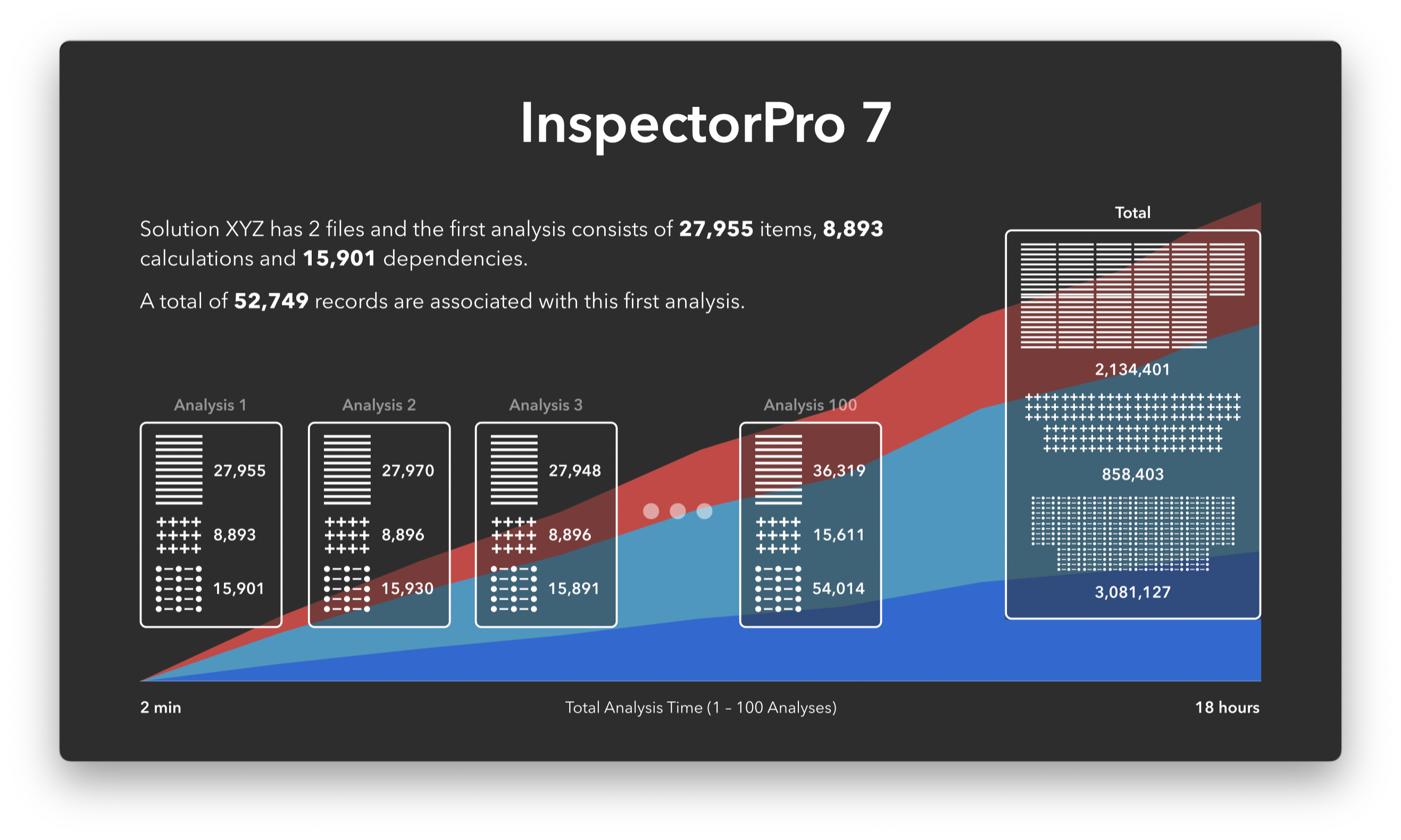
With the introduction of InspectorPro 8 and continues in 9. We switched to using the Save a Copy as XML (xml 2.0) and what we are able to do, with the help of how the document is structured is do the first import to import everything and then every subsequent import is only the things that have changed. So immediately you'll see a dramatic different in both the amount of space that the new InspectorPro will take and the amount of time it takes to update your solution. The first analysis, which we call a baseline, will import everything. Then after that InspectorPro is able to find only the things that have changed, process those items and be done. So the footprint inside InspectorPro for your solution stays as a one-to-one representation of your system. If your codebase is growing then InspectorPro will also grow, and if your code base is getting smaller then it will also reduce in size.

Intelligent insights, just when you need them
With InspectorPro, the more often you run it the less time it needs to document the changes that have occurred. Thus you made a change to a script and added some steps that reference a field or a layout. If you run an InspectorPro analysis it will document that those fields and layout are now referenced by your new script. This is an import fact to be able to know how much of your code is being used and where. This allows you the ability to make decisions on what code you end up keeping or getting rid of. In the end this also allows you to kept a close eye on not having too much technical debt.
Having this super power allows you replace old code. For example let's say you have a new layout that you are testing out and what to replace an old layout with a new one but only in some cases and maybe only for certain users. InspectorPro can show you with a new visualization all the places where your layout is referenced by and depended on.

It can also present you with a list of references and dependencies for each Layout. Here is an image of all the references of this layout.

Having this information is vital to being able to make informed decisions, without introducing any errors. Not having this information and making random decisions like I am going to remove this layout. In most places in FileMaker you don't get any warnings that tell you this object is in use. It basically asks you if you want to remove it and if you confirm that then it is gone, and if you did not use one of these developer tools then you are making decisions blindly.
another great new feature that we are introducing in version 9 is the ability to watch an area, or specific or group of items. And this feature can also be used to monitor production system. Set up a schedule to run inspectorPro once person day on a production system. What we do is crate a notification for the file (area). And this can apply to a single file or any file that is part of your solution. So when any change whatsoever in your solution is changed then a slack or email notification will be sent to the person you choose to receive it.

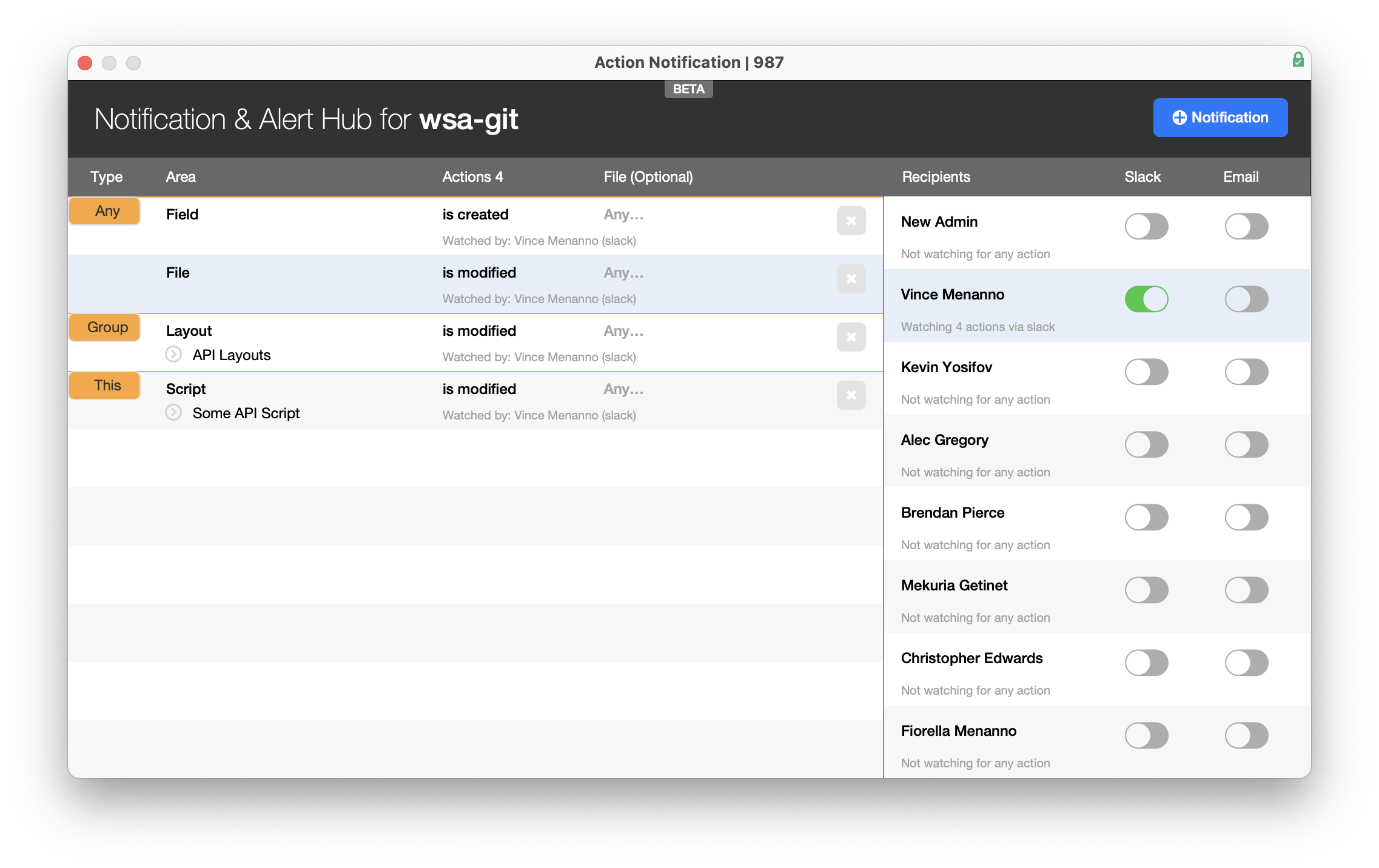
That is for a production system but let's say you have a number of scripts that are being used for some important data processing. If you are responsible for the proper functioning of this solution, then you could set up monitoring to the specific item in question and receive a notification when that item is changed either directly or indirectly.
Collaboration and Code Management Capabilities
One of the most exciting of this new release is the ability to integration directly with GitHub or GitLab.
When setting up your solution you can optionally also set up a repo to allow InspectorPro to write to the repo and allowing the team to be able to see the changes that are made using more traditional tools. We support the following views; current state, blame, and history.

The blame view allows you to see what parts of the code have been changed and by who and when.

And the History view allows you to see the exact changes that were made to your code.

All these views exist directly out of FileMaker. So there is no need to navigate to another system to see the results. These views of changes to the code are textual representations of the code and are not at this time meant to actually check the XML of the code changes into Git.
Having this information for certain companies is vital and crucial.
In addition to Git integration we also support the ability to add notes and tags to just about anything in your solution. And then to be able to locate those notes and tags using global search.

These are just a few of the new features available in the new version of InspectorPro 9