We are pleased to announce the release of bBox version 1.06 for Claris® FileMaker®, which adds support for macOS text windows and many update enhancements, including to bBox’s support for integrating Python code with your FileMaker apps.
bBox is a free utility plug-in to extend FileMaker solutions to easily use code libraries. Supporting both macOS & Ubuntu Linux, it has functions to help you work with Python, JavaScript, PHP, Ruby, AppleScript, Bash/Zsh/sh, XPath, and DuckDB. Also included is a demo file that has over 220 examples of how you can put bBox functions to work for you.
If you’re interested in Python integration with FileMaker, also check out bzPython-FM, which uses bBox.
The bBox product page includes links to downloads, product info and documentation.
What’s New in bBox 1.06
macOS Native Text Windows (beta)
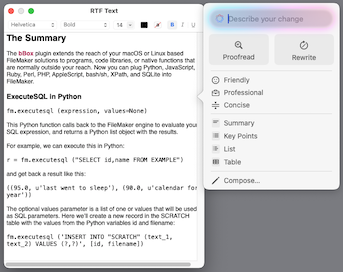
To begin using this feature, you first need to instantiate a window. You’ll specify the window title, its initial content, and its initial position & size. For the content, you can use text, HTML, or an RTF file. If succesful, you’ll get a positive number back for the window reference number. An example of its usage is below, where we’ve passed in the path to an RTF file, and $win holds the window reference number.
bBox Text Window Open [ Select ; Destination: $win ; Title: 'RTF Text' ; Input Type: RTF File ; Input: '/Users/Shared/RTF_Example.rtf' ; Frame: '{400,400,400,500}' ]
Note that the position & size parameters are a single text parameter inside of curly brackets, similar to a JSON array of numeric values.
As a nice side effect of exposing the text in a standard macOS window, Apple Intelligence Writing Tools are enabled if available.
To work with existing windows, use the bBox Text Window Action script step with one of its operators. The operators are:
- Activate [ reference ]
- unhide the referenced window if hidden, and bring to front
- Close [ reference ]
- remove the window and dispose of its data
- This is the default action for the
bBox Text Window Actionscript step
- Get HTML [ reference ]
- get the HTML version of window contents
- Get Frame [ reference ]
- get the position & size of the window
- Get Selected Ranges [ reference ]
- get the selected range(s) of text, returned a brace & comma delimited text (e.g., {100, 200})
- Get Text [ reference ]
- returns the contents of window as plain text
- Hide [ reference ]
- remove the window from view, but keep its contents and meta data
- Set Frame [ reference; frame ]
- set position and size of window in the format of “{originX, originY, width, height}”
- Set Handler [ reference; filename; script name ]
- script to call when the window is closed, moved, etc.: parameter will be window number & the event
- Set Selection [ reference; range ]
- set the selected text region for the text view at the given starting and ending position
- Set Text [ reference; text ]
- set the contents of the window to the given plain text, replacing the previous contents
- Set Title [ reference; title ]
- set the window’s title to the given text
- Set Uses Inspector Bar [ reference; flag ]
- pass True to enable
- Set Uses Ruler [ reference; flag ]
- pass True to show the ruler
- note: not working for all environments
An example of a script using many of these options is below. This is largely the same as the script “Text Window test” in the demo file.
#  USING PLAIN TEXT
Insert Text [ Select ; Target: $sampleText ; “Return delimited text to test the window functionality with.	A second line of text to display.” ]
bBox Text Window Open [ Select ; Destination: $win ; Title: 'Plain Text Window' ; Input: $sampletext ; Frame: '{380,380,600,400}' ]
Pause/Resume Script [ Duration (seconds): 3 ]
bBox Text Window Action [ Select ; Reference: $win ; Parameter 1:    ; Parameter 2:    ]
#
#  USING RTF  >> assumes RTF_Example.rtf was previously created <<
bBox Text Window Open [ Select ; Destination: $win ; Title: 'RTF Text' ; Input Type: RTF File ; Input: '/Users/Shared/RTF_Example.rtf' ; Frame: '{400,400,400,500}' ]
#
bBox Text Window Action [ Select ; Reference: $win ; Operation: Set Handler ; Parameter 1: Get (FileName) ; Parameter 2: 'Text Window handler' ]
#
bBox Text Window Action [ Select ; Reference: $win ; Operation: Set Uses Inspector Bar ; Parameter 1: 0 ; Parameter 2:    ]
#
bBox Text Window Action [ Select ; Reference: $win ; Operation: Set Uses Inspector Bar ; Parameter 1: 1 ; Parameter 2:    ]
#
bBox Text Window Action [ Select ; Reference: $win ; Operation: Hide ; Parameter 1:    ; Parameter 2:    ]
#
bBox Text Window Action [ Select ; Reference: $win ; Operation: Activate ; Parameter 1:    ; Parameter 2:    ]
#
bBox Text Window Action [ Select ; Reference: $win ; Operation: Set Selection ; Parameter 1: '{100,200}' ; Parameter 2:    ]
#
bBox Text Window Action [ Select ; Destination: $range ; Reference: $win ; Operation: Get Selected Ranges ; Parameter 1:    ; Parameter 2:    ]
#
bBox Text Window Action [ Select ; Destination: $void ; Reference: $win ; Operation: Set Frame ; Parameter 1: '{200,250,500,600}' ; Parameter 2: 250 ]
#
bBox Text Window Action [ Select ; Destination: $void ; Reference: $win ; Operation: Set Title ; Parameter 1: 'New Window Title' ; Parameter 2:    ]
#
bBox Text Window Action [ Select ; Destination: $void ; Reference: $win ; Operation: Set Text ; Parameter 1: 'Some basic text to replace what is there currently. Nothing too fancy here, this is just plain text.' ; Parameter 2:    ]
If the window reference is missing or incorrect, a 102 error will be returned.
For the handler subscript, the messages it receives largely corresponds to the names of NSTextView methods. These are:
- DidBecomeMain
- DidDeminiaturize
- windowDidResize
- windowDidEnterFullScreen
- DidEnterFullScreen
- DidMiniaturize
- ShouldClose
- WillClose
- WillExitFullScreen
An example of handler looks like this:
# Create a new record and save our message to a field.
Go to Layout [ “SCRATCH” (SCRATCH) ; Animation: None ]
Enter Browse Mode [ Pause: Off ]
New Record/Request
Set Field [ SCRATCH::text_1 ; Get (ScriptParameter) ]
Go to Layout [ original layout ; Animation: None ]
Current limitations:
- Although listed, Markdown input is not currently supported.
- Window handlers are global to all currently open database files.
- If windows are not tracked closely your system can leave a window orphaned.
Related to that last point, there isn’t currently a way to know what windows are open if you don’t have the window references saved. An option to return a list of open windows is planned for a later version however.
GraphicsMagick Now External
In order to better handle out-of-band updates, bBox on macOS now uses a separate install of the GraphicsMagick command (gm) with either MacPorts or Homebrew.
Once installed, this will be an invisible change, except that if using Homebrew remember to add 16 to the mode value to set the alternate path flag.
There’s no change if running on Ubuntu Linux, as GraphicsMagick has always required the use of apt or apt-get to be installed there.
General updates & enhancements
- updated: DuckDB upgraded from 1.1.1 to 1.3.0
- updated: JQ upgraded to version 1.7.1
- updated: Ubuntu 22 & 24: JavaScriptCore version updated from 4.0 to 4.1
- fixed: temporary files not always closed with certain usage
- fixed: script step parameters using option lists not compiling correctly (but no error given in FM Pro)
- misc: scratch files created in /tmp are now prefixed
bBox_file_instead ofbBox_posix_
Python enhancements & updates
- Python version used for bBox_PythonCompile/Evaluate/Execute updated to 3.11
- bBox_PythonCompile was using Run Async bit flag (4) as the Skip Finalize flag (8)
- fm.foundcount(): Python convenience function, equivalent to Get (FoundCount)
- fm.totalrecordcount(): Python convenience function, equivalent to Get (TotalRecordCount)
- fm.windowmode: fm.foundcount(): Python convenience function, equivalent to Get (WindowMode)
Known Issues
- the
fmevaluatefunction in DuckDB does not work on the current build if using the amd64/intel version of Ubuntu - If the IP plug-in for InspectorPro is also installed, the DuckDB version used will be 1.1.1
Addendum 2025-09-20
A bug has been found in the fm.evaluate function for Python. This will be fixed in an upcoming release.