InspectorPro has been Vince Menanno's passion project for over three decades—a tool born not just from curiosity but from a commitment to elevate the way FileMaker apps are built, debugged, and deployed.
Today, we're thrilled to announce that InspectorPro is now freely available to developers, for use with Claris FileMaker 2025.
That's right...every feature, every enhancement – including new Git integration and AI functionality – is now available to you and your team at no cost.
Why? Because powerful tools shouldn't be out of reach. InspectorPro 9 speeds up development and helps you collaborate smarter with Git integration, change notifications, AI Script Summaries and Semantic Script Searching. This bridges the gap between individual developers and teams—making it easier to code together, catch issues early, and stay in sync.
As Beezwax's Chief Innovation Officer, Vince Menanno has spent years reimagining what's possible with FileMaker. Backed by the collective expertise of the Beezwax team, InspectorPro has become an important resource for professional FileMaker developers—and it's only getting better. New ideas, innovations, and collaborative contributions will continue to shape its evolution.
InspectorPro is ready for you—download it today and transform the way you build FileMaker apps. Whether you're flying solo or working with a team, this is your new go-to tool for smarter, faster development.
Getting Started with InspectorPro 9 and FileMaker 2025
Download InspectorPro 9 -- You'll also need FileMaker 2025 to make use of it.
You can simply register a license code at no cost and that code will be a non-expiring license code – for as many servers and users as you need.
Help with InspectorPro and FileMaker Development
InspectorPro isn't just a tool—it's built using FileMaker 2025, incorporating the result of thousands of hours of R&D, feedback from the developer community, and years of thought leadership in FileMaker innovation. By using it, you're tapping into decades of experience, best practices, and hard-earned insights from some of the platform's most passionate experts.
The decision to make InspectorPro 9 freely available was a recent one. While a tool like this can do a lot for a development team, it is ultimately only part of the equation. At Beezwax, we also concentrate on the other challenges that developers face every day. You might...
- Getting Git (GitHub or GitLab) running and optimized
- Have an aging solution that you would like to get modernized
- Seeing problems identified and need guidance with fixing them
- Curious about how AI could be added to your solution
- Starting a new project and need some help
If any of these are things that you feel you could use help with, we would be thrilled to discuss them with you.
Our team is also very excited to step into a new world with the use of this tool, to use it on a regular basis. We also hope that you'll soon see why having a tool like this is indispensable in your day to day development work. Let us know if it is helpful to you and if you have any future suggestions or ideas.
What's New with InspectorPro 9 -- for FileMaker 2025
Officially Using 'Save a Copy as XML'
When we switched over to using Save a Copy as XML (with InspectorPro 8 for FileMaker 2024), we were finally able to automate the process to run analyses entirely on FileMaker Server.
We have also built an integration Add-on that you can install in your solution.
so you can (optionally) type a comment and, when it is hosted, it will automatically generate the XML and start processing it.
But before you start processing XML, let's make sure you can generate it first.
Select the 'Settings...' menu item under the 'FileMaker Pro' menu.
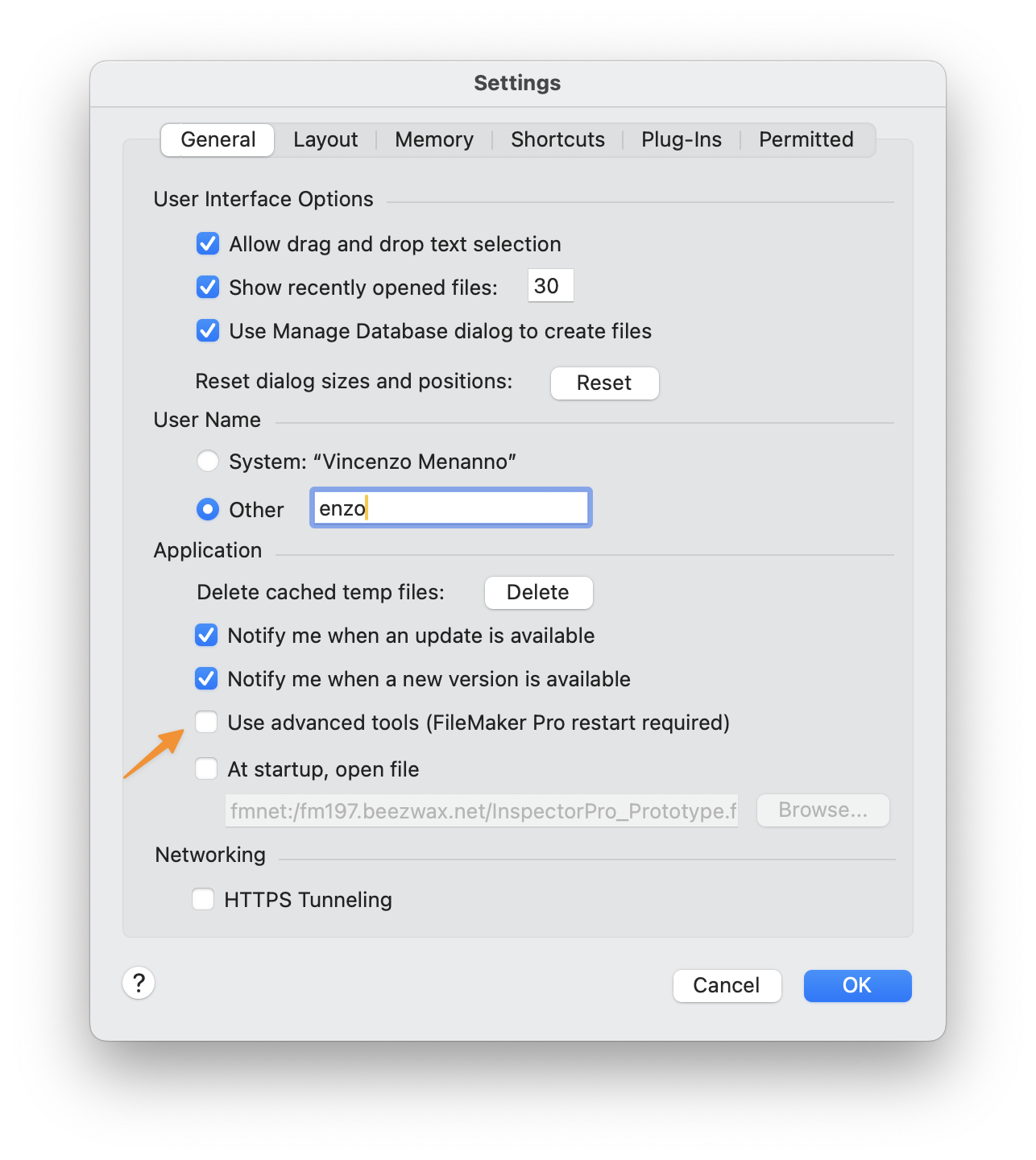
Make sure the 'Use advanced tools' checkbox is checked. You'll need to restart FileMaker Pro for this change to take effect. Then you will see a new menu called 'Tools'. From this menu you can manually generate the XML output for your file(s), by selecting Save a Copy as XML....

Note: You can also generate the Save a Copy as XML output using a script step but having the Tools menu available also gives you access to Script Debugger and Data Viewer.
You'll see a dialog that asks you to name the file. InspectorPro requires that you name the XML file after the name of your FileMaker file. InspectorPro will also require that the 'Include details for analysis tools' checkbox is checked. This was introduced in FileMaker Pro 21.1.

Don't worry too much about this, if you want to use the InspectorPro Add-on 2.0 integration which will take care of all this. The nice thing related to this is that you can use a script step to be able to generate the XML. If you don't want to be bothered to have to check that checkbox every time, then you can also automate the process of generating the XML - all you need is a couple of script steps, which I'll show here.
Note: The XML should only be used to consult it You should not be making changes to it because it really is just one direction (outgoing). In the future making changes to a document like this and creating a new file from it should be possible... but that is a ways off. For now, it is worth noting that when you run these two steps that it will clobber.
Clobbering is the act of overwriting a resource such as a file - you can find out more from wikipedia

However, if you just want to look at the file and explore it on your own, then you can name it anything you like and you can enable or disable that option. It's up to you.
Include details for analysis tools - introduced in FileMaker v21.1
Let's look at it from a calculation field perspective. Here is a very simple calculation:
If ( INVENTORY > 10 ; 'Sufficient Inventory' ; 'Need to Red-Order' )
In FileMaker v21.0
We had the actual calculation and the chunks all included in the same place.
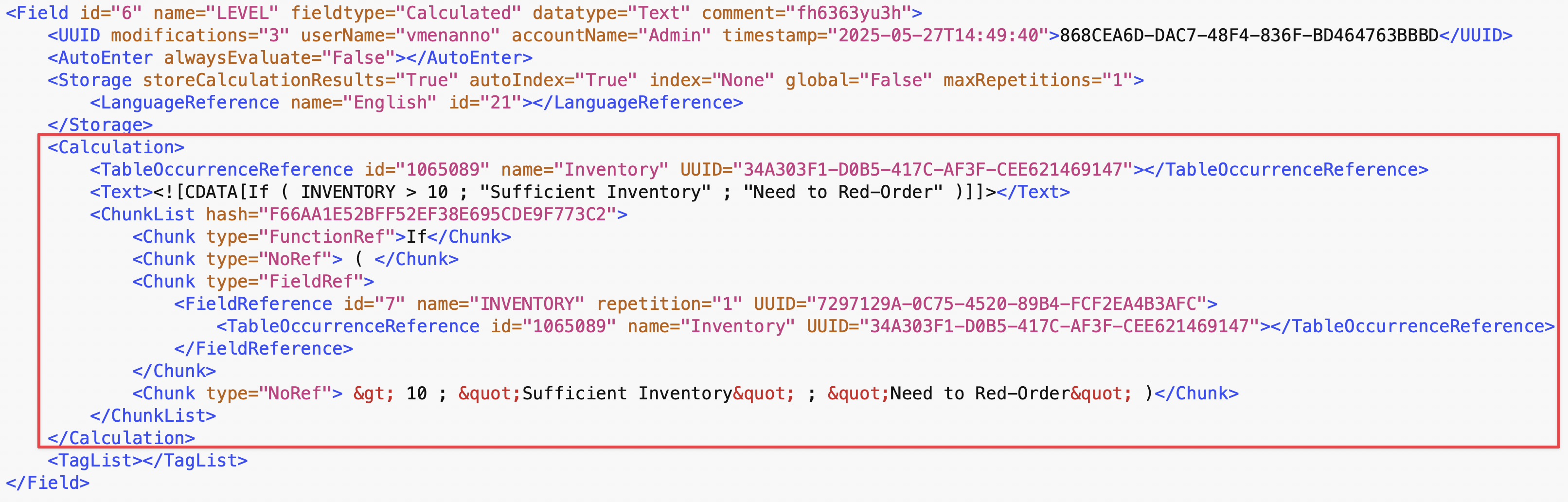
The chunks are the components that make up the calculation all in one place.
And, in FileMaker v21.1
Here is the field element how it looks like in 21.1

Notice that it only outputs the calculation and not the chunks. You'll see a new element called 'DDRREF' and with that key you'll be able to find the calculation chunks that are output in a different section of the XML document. That section is called 'DDR_INFO'. I think the reason for this is that normally they don't need this information for other uses of the XML file.

Now using FileMaker 21.1 let's generate the same XML output but without checking that checkbox of Include details for analysis tools. Note that the ChunkList is no longer being output. Also worth nothing that the XML will be smaller and more compact especially in places where you have calculations.

Now let's generate it with the Include details for analysis tools option enabled. Now we see a new line appear. We see an element called DDRREF with something that looks like a UUID (but not). and two attributes, 'kind' and 'hash'. The ChunkList items and the DDRREF element it NOT output when the XML is generated without that 'include details for analysis tools' option. But when it is on, I have seen two different kinds of things. One of them is for telling us where the Chunks can be now found, basically by following the key associated with DDRREF. And the other type is of StepText... and in a similar way this is also done for the StepText.

There is a new section after the Metadata section of the XML called DDR_INFO ... that so far includes all the Chunks of the calculations (this is where they have been moved to) and the StepText.
Worth noting, this is something that developer tools developers have asked to return the StepText that was missing in the new format and this is where they have brought it back. And here below is an example of both of them and what they look like. Just showing one calculation ChunkList and a few StepText items.
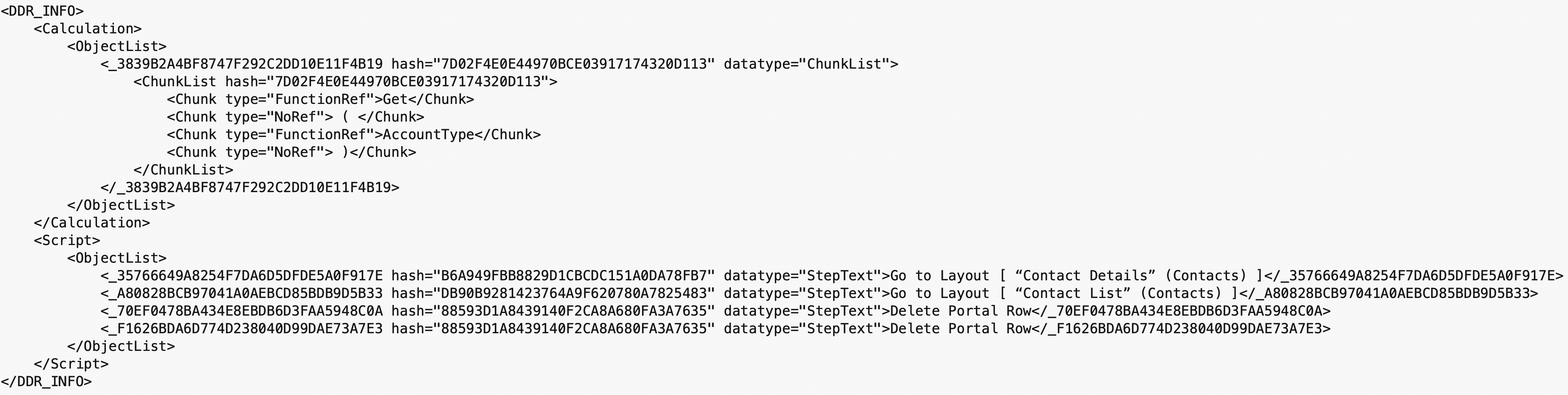
These were the big changes in FileMaker v21.1. Since that time and with the release of FileMaker 2025 (v22.x) there are many more changes that have been made. And so for this reason InspectorPro 9 will only work with FileMaker 2025 (v22.x).
In a follow-on blog post, we'll cover some of the benefits of using InspectorPro 9 for FileMaker 2025 (v22). I hope you benefit from using it, and let us know if you need help.